> For the complete documentation index, see [llms.txt](https://wiki.loadium.com/llms.txt). Markdown versions of documentation pages are available by appending `.md` to page URLs; this page is available as [Markdown](https://wiki.loadium.com/creating-your-first-test-1.md).
# Quick Start
A quick introduction for Test Creation - Running - Analyzing
Loadium is designed to have a straightforward process to manage your load tests.
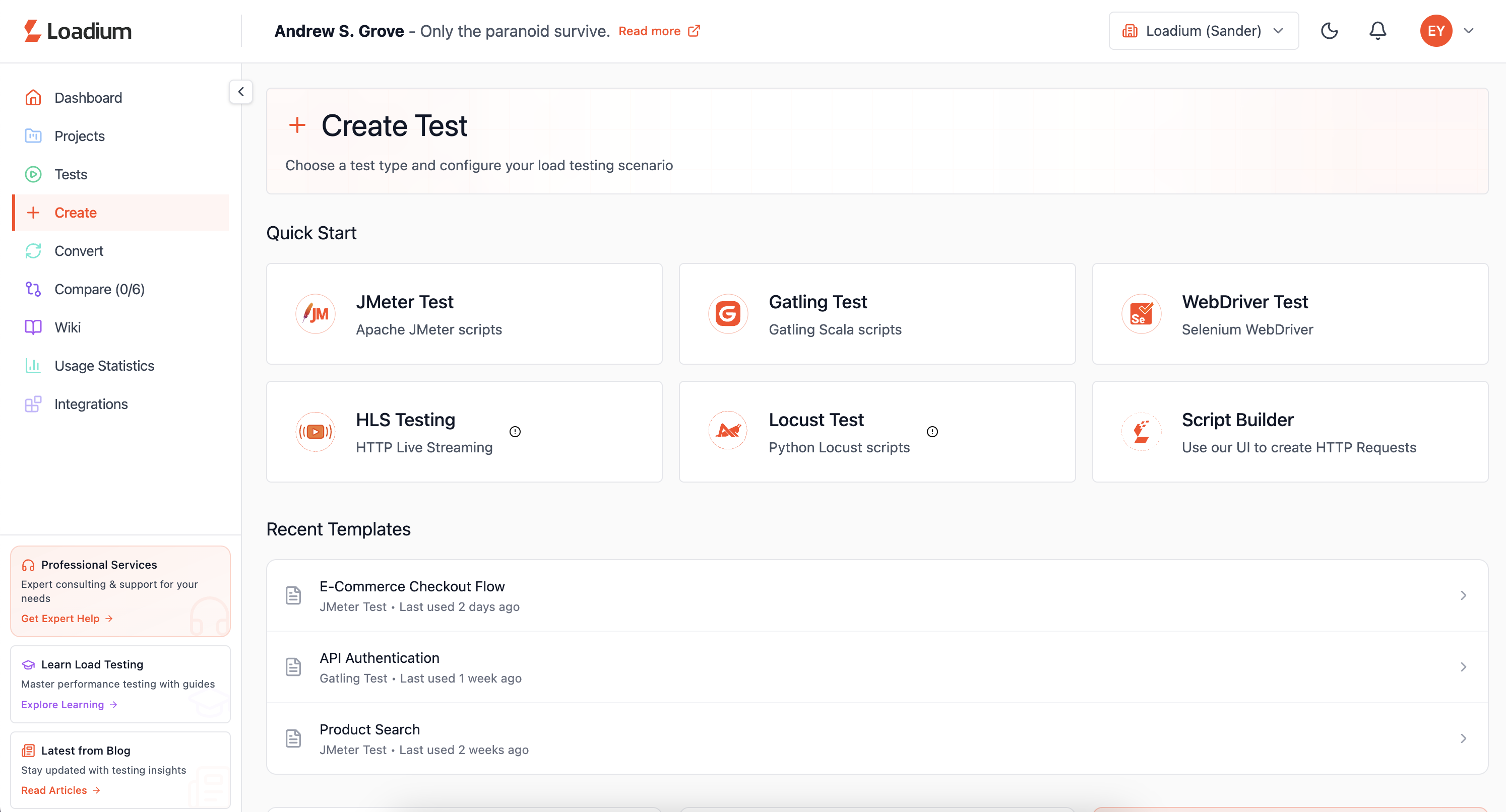
When you first log in to Loadium, you will be presented with Dashboard Page. There are nine tabs in the banner menu:
{% tabs %}
{% tab title="Dashboard" %}
Displays the user’s plan details, the number of tests executed over the past six months, monthly VUH usage, and recent sessions.
{% endtab %}
{% tab title="Projects" %}
Allows grouping of the created tests and displays them.
{% endtab %}
{% tab title="Tests" %}
Displays the list of created test sessions along with their configuration details, including test type, ramp-up duration, test duration, and number of virtual users.
{% endtab %}
{% tab title="Create" %}
Allows you to start creating a test with Script Builder, JMeter file, Gatling file, and Selenium WebDriver editor.
{% endtab %}
{% tab title="Convert" %}
Converts Postman collections, HAR, and Swagger files into testable formats within Loadium. Also allows uploading JTL reports to generate more readable report outputs.
{% endtab %}
{% tab title="Compare" %}
Allows you to compare the results of test runs with each other.
{% endtab %}
{% tab title="Wiki" %}
Provides access to documentation and guides for using Loadium, including feature explanations, best practices, and step-by-step instructions.
{% endtab %}
{% tab title="Usage Statistics" %}
Displays Loadium usage details through usage trend charts, including remaining VUH balance and the distribution of executed tests by type.
{% endtab %}
{% tab title="Integrations" %}
Enables integration with third-party applications such as Microsoft Teams, Datadog, and Microsoft Azure.
{% endtab %}
{% endtabs %}
## 1) Test Creation
To start creating a test, you can either choose to create a new one through the online no-code web editor or upload your previously created script from the desired technology.
### Script Builder
You can create your own script from scratch through Loadium’s online editor. It can be accessed from the left-hand menu by navigating to Create → Script Builder after login.
{% tabs %}
{% tab title="Simple HTTP Builder" %}
#### Simple HTTP Builder
A simplistic approach for creating your script where you will enter basic parameters like request type (GET, POST, PUT, DELETE), request URL, reponse\&connection timeout, etc.
Get started quickly with the Simple HTTP Builder guide:
{% content-ref url="/pages/p4Qj6mAUhBDNFuf0dAkN" %}
[Script Builder](/create-test/loadium-record-and-play-1.md)
{% endcontent-ref %}
{% endtab %}
{% tab title="Record\&Play" %}
#### Record & Play
A more advanced approach where you can also record your web surfing with the Google Chrome extension to be used in the editor.
Get started quickly with the Record\&Play guide:
{% content-ref url="/pages/p4Qj6mAUhBDNFuf0dAkN" %}
[Script Builder](/create-test/loadium-record-and-play-1.md)
{% endcontent-ref %}
{% endtab %}
{% endtabs %}
### By Uploading Script
Loadium supports open-source technologies to create & run your tests:
{% tabs %}
{% tab title="JMeter" %}
#### JMeter Test
Apache JMeter is an open-source tool that supports many protocols like HTTP, JDBC, LDAP, FTP, etc. Creating a JMeter test is the main feature of Loadium which supports all the key features of JMeter.
Get started quickly with the JMeter Test guide:
{% content-ref url="/pages/WfTjbcNWw11klGow67OJ" %}
[JMeter Test](/create-test/jmeter-test-1.md)
{% endcontent-ref %}
{% endtab %}
{% tab title="Gatling" %}
#### **Gatling Test**
Gatling is an open-source performance testing framework based on Scala, Akka and Netty. You can simply upload your Gatling file and desired CSV files to create your test and start testing.
Get started quickly with the Gatling Test guide:
{% content-ref url="/pages/9Cenwdp15fENjqCERuAp" %}
[Gatling Test](/create-test/gatling-test-1.md)
{% endcontent-ref %}
{% endtab %}
{% tab title="Web Driver" %}
#### Web Driver Test
Selenium WebDriver is a functional test automation library, you can use your Selenium scripts to create performance tests. You can also use Java and Javascript language to create Selenium-based performance tests.
Get started quickly with the Web Driver Test guide:
{% content-ref url="/pages/CJepNQB2G9GeTDTVqAvS" %}
[WebDriver Test](/create-test/web-driver-test-1.md)
{% endcontent-ref %}
{% endtab %}
{% tab title="HLS" %}
HLS testing is supported in Loadium to analyze streaming performance under load. It enables simulation of concurrent users consuming media content and provides detailed metrics for evaluating streaming quality and stability.
{% content-ref url="/pages/1U7N01Mhy2xBGEOrKiwF" %}
[HLS Test](/create-test/hls-test-1.md)
{% endcontent-ref %}
{% endtab %}
{% tab title="Locust" %}
Locust is an open-source load testing tool that allows writing test scenarios using Python. Loadium supports Locust by enabling users to upload and execute Locust scripts while leveraging distributed infrastructure for scalable test execution.
{% content-ref url="/pages/XTbjPTPZcnFr3AV7utrb" %}
[Locust Test](/create-test/locust-test-1.md)
{% endcontent-ref %}
{% endtab %}
{% endtabs %}
## 2) Running
During test creation, you can manage the test settings to shape the test running course.
{% tabs %}
{% tab title="Load Configuration" %}
You can configure the virtual user count, ramp-up period, and test duration, as well as define load distribution using linear or multi-step patterns (some parameters may vary between technologies).
Load Type: Linear
Load Type: Multi-Step
{% endtab %}
{% tab title="Geolocation" %}
You can choose to distribute your load generation to multiple locations with Cloud Service or use your personal servers with Private Locations.
You can see our guides for more detailed information.
{% content-ref url="/pages/SFNOS0dGFBaza0lOUVmw" %}
[Geolocation](/test-settings/what-is-geolocation-1.md)
{% endcontent-ref %}
{% endtab %}
{% tab title="Scheduling" %}
An optional feature where you can schedule your tests to automate their run.
{% content-ref url="/pages/e8VHtHoyq8cX051p68VY" %}
[Test Scheduling](/test-settings/test-scheduling-1.md)
{% endcontent-ref %}
{% endtab %}
{% tab title="Failure Criteria" %}
An optional feature where you can choose certain KPI metrics and set thresholds for each request to track their performance
{% endtab %}
{% endtabs %}
When you finish creating a test, the information you have put; uploaded files, load configurations, geolocations, KPI, etc. will be saved and you can access it from the Tests Page. You can run your created tests from the Tests Page.
## 3) Analyzing
{% tabs %}
{% tab title="Test Report" %}
During a test run, the test metrics will be presented lively. After a test finishes, you can access these reports from the test's Sessions page.
You can check out the Test Report guide for a more comprehensive cover:
{% content-ref url="/pages/Fiy2SmQZalTXkcr3g8ww" %}
[Test Report](/features/test-report.md)
{% endcontent-ref %}
{% endtab %}
{% tab title="Compare Test" %}
Loadium allows you to compare your tests to help you to analyze your tests better.
You can check out the Compare Test guide for a more comprehensive cover:
{% content-ref url="/pages/mjAzEYSRDQcZFnnquzIH" %}
[Compare Test](/features/compare-test-1.md)
{% endcontent-ref %}
{% endtab %}
{% tab title="Observing Progress" %}
After several runs of your same created test, the overall progress of test results will be presented in the test's Sessions Page.
{% endtab %}
{% endtabs %}
If you don't see the answer to your question here, please [reach out to us](https://loadium.com/contact-us/) to let us know! We're always improving our documentation.